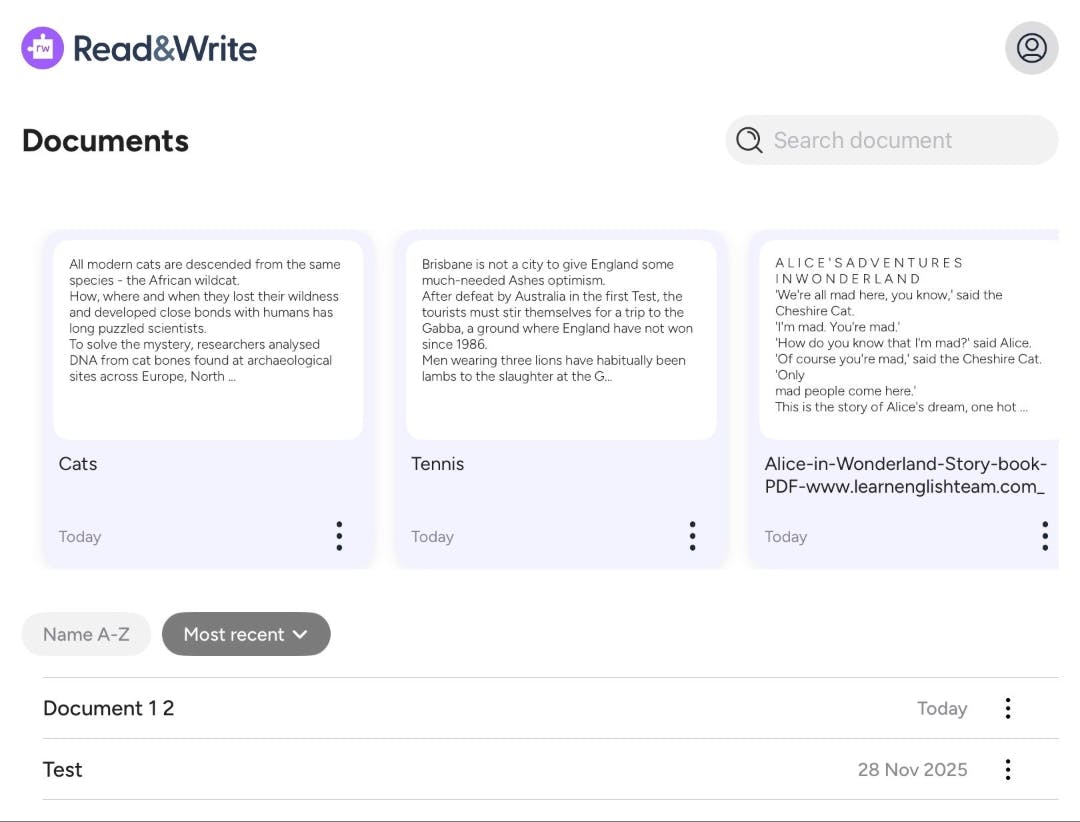
We have introduced a new home screen for the Read&Write iOS editor, along with enhanced prediction settings in the Co:Writer prediction feature.
These updates make it easier to manage documents and give users more control over how they write.
Available now in the Read&Write writing app.
What’s new
A cleaner, simpler home screen
The editor now opens to a new home screen, showing a clear list of recent Read&Write documents. From here, you can:
- View all documents in one place
- Sort documents by name or date
- Create a new document and import an existing file
More personalized prediction settings in Co:Writer
There are now more settings are now available in the writing app. It's now possible to:
- Choose how many suggestions appear in the prediction bar
- Select vocabulary level used in predictions
- Create a new document and import an existing file
Designed for classroom learning
In busy classrooms, small barriers can interrupt focus. A clearer starting point helps students stay organised while flexible prediction settings allow educators to better match writing support to each learner’s level and confidence.
Students can write with greater independence. Educators can provide more personalised support.
It is a simple update that makes everyday writing more organised, more flexible, and more supportive for every kind of mind.