Read&Write and OrbitNote have opened up the curriculum for every learner at OLSH, supporting students with identified learning needs and the wider student population to learn in ways that suit them best.
- System-wide adoption across the school population, ensuring access at school and home
- Growing usage year-on-year, showing long-term impact and sustainability
Our Lady of the Sacred Heart College is an independent all-girls secondary school in Kensington, New South Wales. 800 students are enrolled, 10-20% of whom have identified learning needs.
 Read&Write
 OrbitNote
Personalisation in the classroom and access to the curriculum was a key driver in making the decision to implement Read&Write across the entire college.”
Background
Our Lady of the Sacred Heart College (OLSH) is an independent secondary school in Kensington, New South Wales. Over 800 girls attend the school.
OLSH is a Google Classroom-based school, and every student has her own device (both Mac and Windows are accommodated). Students use their devices in every class, but they are expected to present their work using pen and paper too.
OLSH first adopted Everway’s Read&Write toolbar during the Covid-19 lockdown when students had to learn remotely. The college was looking for a learning support tool that could act as a remote teaching aide.
Read&Write stood out as a solution. “It's super easy to use,” said former College Principal Brigid Taylor. “It links with Google seamlessly. It was really easy to get everyone on board, especially in the remote learning environment.” The team at OLSH noted its flexibility for use at home and at school, as well as the ease of distributing it to all students and staff.
Supporting identified needs
Around 10-20% of the students at OLSH have identified learning needs. Tracey Dunne, Leader of Learning Enrichment, explains the range of learner profiles at OLSH: “We have a diverse group of students, as all schools do. We have those with specific learning difficulties including dyslexia, dysgraphia, auditory processing disorder, ADHD, mild visual impairment or who have English as an Additional Language.”
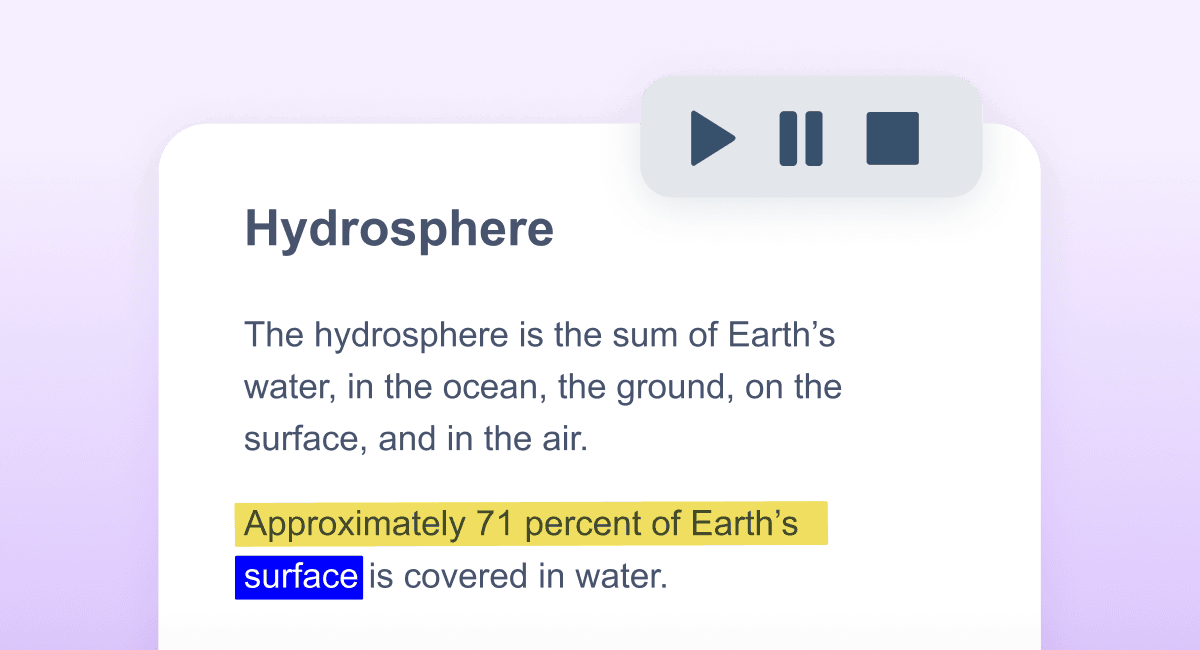
Read&Write offers a suite of tools to help students access learning material according to their needs. The main feature that attracted the team to Read&Write was the customisable text-to-speech. This feature allows students to highlight a stretch of text and have it read aloud to them in a voice and pace of their choice, with dual-highlighting to support comprehension. This was particularly helpful to students with dyslexia or ADHD as it hones focus and reduces reading fatigue.
This technology has allowed our students to thrive. It offers them many ways to show what they know.”
Similarly, students who require additional support with writing have benefited from Read&Write’s dictation feature as well as its vocabulary, grammar and spelling aids. Together, these help to improve the quantity and accuracy of students’ writing, and ensure they can communicate their true understanding of a topic without additional barriers.
“When students are invited to demonstrate their knowledge in different ways and the learning environment seamlessly allows for this,” explains Brigid, “it ensures all contributions are valued and students gain agency over their learning.”
Brigid notes how the support from digital tools such as Read&Write has helped students grow in confidence and understand that success can be measured in a variety of ways.
“This technology has allowed our students to thrive. It offers them many ways to show what they know... Which they couldn't do before when they just had pen, paper and a textbook.”
Reaching every learner
Originally, OLSH adopted Read&Write to support students with identified needs, but the team soon realised that it presented much wider potential.
“Personalisation in the classroom and access to the curriculum were key drivers in the decision to implement Read&Write across the entire college,” says Tracey.
Brigid agrees: “When we looked more deeply into it, we thought this is a great tool for every single student. There's such a vast array of tools within the Read&Write suite that help with everyone's needs, including those of teachers.”
As Read&Write is available to every student at the school, teachers have encouraged everyone to use it. High-achieving students have benefited from the highlighter tools and text-to-speech when tackling large volumes of information. At a click, the colour-coded notes can be collected and saved to revisit later. Using the toolbar in this way can help students organise their thoughts thematically and plan out their work.
As well as supporting research and study, Read&Write has also offered teachers a more efficient way of working. “The teachers also find it helpful as they don’t need to type resources,” says Brigid. “They simply record it and it can be uploaded. They are using Read&Write for reports, summarising, taking notes and a multitude of other things.”
A different way of learning
OLSH have found that a tech-centred learning approach has not only improved accessibility but also offered new ways of teaching and learning which can benefit everyone.
”Technology allows students to create work they weren't able to do previously with the use of a textbook,” says Brigid. “We’re able to provide them with different ways to show what they know.”
OLSH are clear that integrating digital tools into teaching and learning should not mean substituting a textbook with a laptop. OLSH use the SAMR teaching model (Substitution, Augmentation, Modification, and Redefinition), approaching digital tools with the view to how they can support learning.
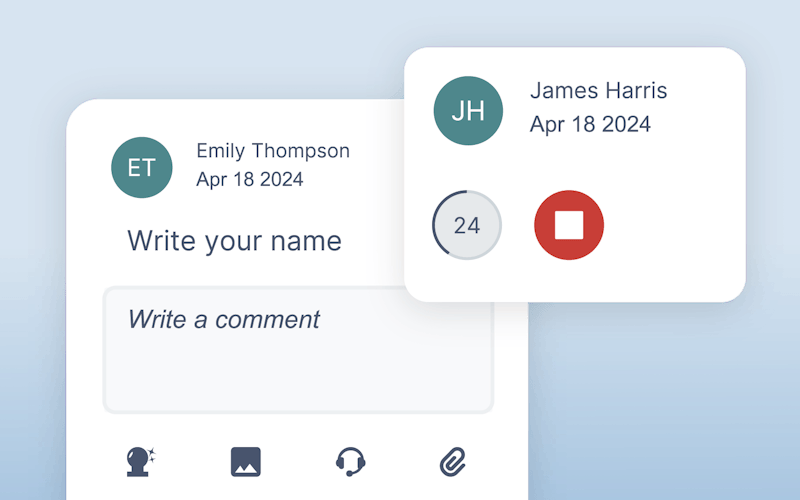
OLSH now also have access to OrbitNote, Everway’s PDF editor. This tool brings to PDFs all the accessibility and literacy support you’ll find in Read&Write. It also provides advanced feedback, annotation and collaboration tools. This means teachers can create and respond to assignments with ease. OrbitNote supports real-time feedback in accessible and flexible formats – whether it’s a written comment, voice note or video note. They can scaffold tasks, clarify points, answer questions and provide in-depth feedback.
Brigid credits Everway tools with creating a two-way conversation between students and staff. “Read&Write and OrbitNote have expanded how students are given feedback and how they present what they know. The specific accessibility tools alongside the reading and writing tools have helped to level the playing field for all students.”
These features can also aid student collaboration. Students working on a group task can work on the same document and use the annotation features to share and refine ideas.
Lasting impact
The staff at OLSH can see the difference that Everway tools have made to their students. Read&Write and OrbitNote have introduced a new level of personalisation not only for their targeted learning support, but to the wider school community.
“For some of our girls who struggled with the amount of reading that they had to do, it has 100% completely opened up the curriculum to them,” says Brigid. “For our diverse learners it has provided them with access to learning that they didn’t have before – in a very easy and discreet way. Nobody knows they are using it, and that’s a game changer. When you are a student who struggles in a mainstream school, you don’t want to stand out, but you need help to access the curriculum. Read&Write has allowed us to do that.“