We’ve introduced new enhancements to Collect Highlights in Read&Write for Google Chrome and Read&Write for Microsoft Edge, making it easier for students to organise their research and turn ideas into structured work.
Building on the recent introduction to the new Advanced Collect Highlights experience, this update adds new ways to manage information, helping students move more smoothly from reading to writing.
What’s new
Automatic citations
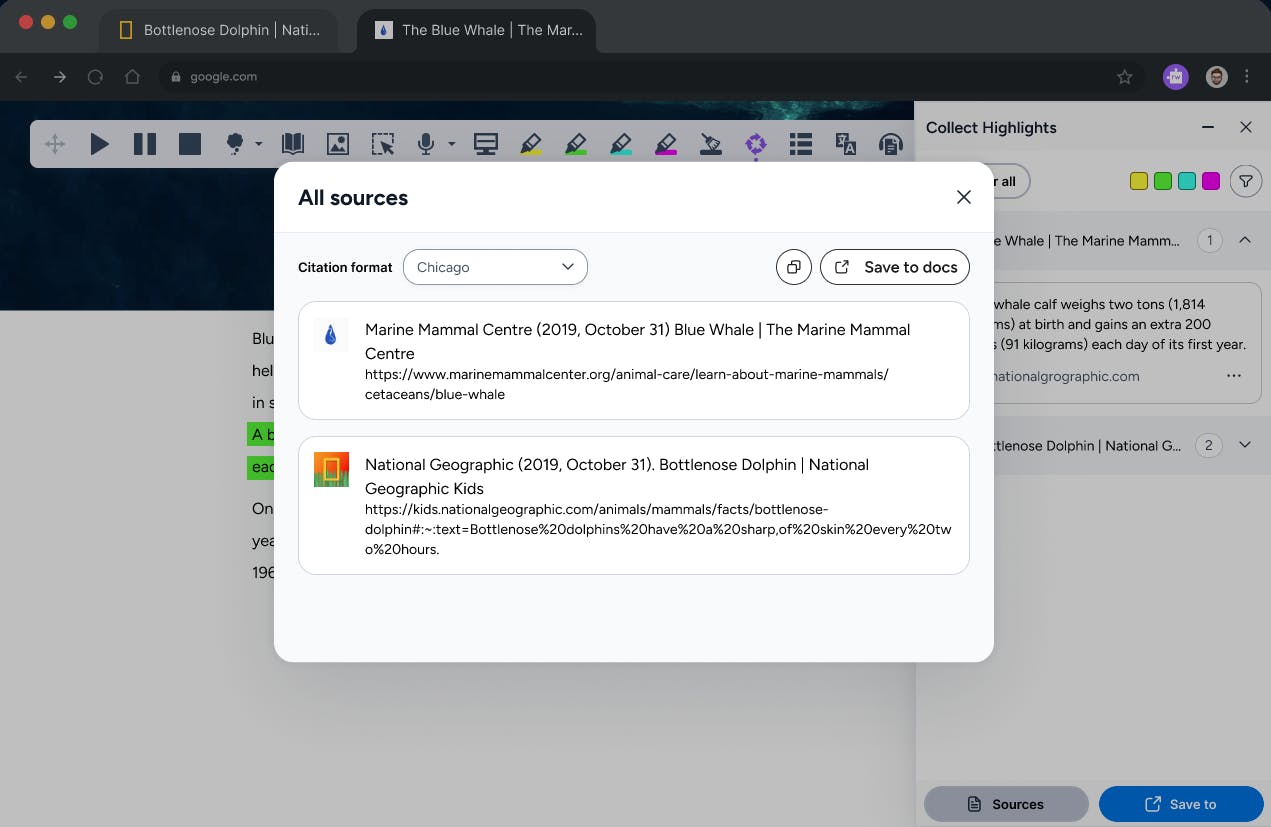
Students can now automatically generate citations from their collected highlights. With support for MLA, APA, and Chicago styles, Read&Write can create a ready-to-use bibliography alongside their research.
This removes the need for manual citation formatting and helps students focus on understanding and using information, rather than managing references.
New ways to organise highlights
New filtering and viewing options make it easier to work with collected information. Students can:
- View highlights grouped by source
- Filter to see only highlights from the current page
These options help students quickly find, review, and organize key ideas across multiple sources.
Designed to support real research workflows
Research often involves gathering information from different places and making sense of it later. These updates help students keep their work organised as they go, reducing the risk of losing track of sources or key points.
By combining automatic citations with clearer organisation, Collect Highlights becomes an even better tool for managing research from start to finish.
Supporting transitions and continued improvement
These enhancements respond directly to feedback from educators and districts, including those transitioning from Snap&Read. They build on a familiar workflow while adding the functionality needed for more advanced research tasks.
This is part of our ongoing work to strengthen Collect Highlights as a powerful, flexible tool that supports students at every stage of the research process.

Explore Read&Write
Discover and explore the full range of Read&Write tools designed to support every learner and user.